Posts Tagged ‘Windows 10’

Windows 10 November Update Released

Posted: November 13, 2015 in Windows 10
Tags:

Summary:

  • Windows 10 first major operating system update ‘November Update(aka Fall Update) was released on November 12, 2015
  • Version Number and Build number as released – Version 1511 Build 10586.3

Comments:

  • Available via Windows Update or the Media Creation Tool[1,2]
  • Staged Rollout via Windows Update(not all systems will be offered the update at the same time)
  • Most notable feature changes
    • Faster Boot Time
    • Start Menu has improved context menus
    • More tile resizing options
    • Number of tile columns increased from 3 to 4
    • Better integration of Cortana with Edge (Editor Note: Still needs work)
  • New ability to upgrade directly from Windows 7/8.0/8.1 to 1511 bypassing RTM version(1507)
  • Ability to directly clean install and activate Windows 10 using Windows 7/8.0/8.1 Product Keys(i.e. no need to perform an upgrade install followed by, if desired, a clean install)
  • Notes:
    • (a) November Update may not be available through Windows Update if the device was upgraded(from 7/8x to 10) in the last 31 days.  After 31 days have passed the update will become available in Windows Update, the only other option if impacted is to use the Media Creation Tool to perform the 1511 installation.
    • (b) After installing Windows 10 1511, Windows Update’s *Update History* will be reset and start thus any update installed prior to 1511 will no longer be present in *Update History*

Additional Information:

Revisions:

November 13, 2015:  Original Draft and Publish Date

November 22, 2015: [Footnote [1] Media Creation Tool temporarily unavailable due to not retaining user settings

November 24, 2015:  Footnote [2] Media Creation Tool available, fixes settings issue and includes Build 10586.11

November 30, 2015:  Added Notes (a) and (b) in Comments section
Windows 10 Media Creation Tool

Posted: October 30, 2015 in Windows 10
Tags: , ,

Summary:   Microsoft tool to create Windows 10 installation media (DVD or USB) or ISO file

Comments: 

  • The Microsoft Media Creation Tool is free downloadable software(*.exe file) that can be run and used by end-users to:
        • Create Windows 10 installation media on a DVD disc, USB Thumb Drive or an ISO file for mounting
        • Upgrade the PC to Windows 10
  • Where to obtain – https://www.microsoft.com/en-us/software-download/windows10
        • Click on the above link to load the Microsoft web site and the option to download the Media Creation Tool
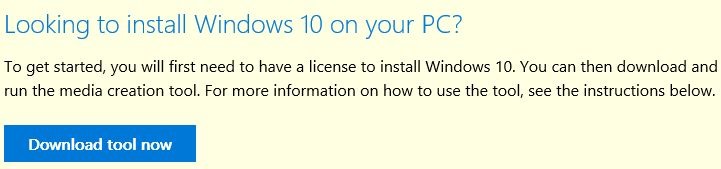
        • Scroll down and click on the box ‘Download tool now’(see below)

W10_MCT_01

        • Save the *.exe file (MediaCreationTool.exe) to your local storage(hard drive, usb thumb drive)
        • Run the exe file to create Windows 10 installation media or upgrade to Windows 10


Additional Information:


  • Also, another good resource on clean installing Windows 10 can be found in Microsoft MVP(Greg Carmack) WIKI


Revisions:

October 29, 2015: Initial Draft and Publish Date

October 31, 2015: Added Additional Information section and links

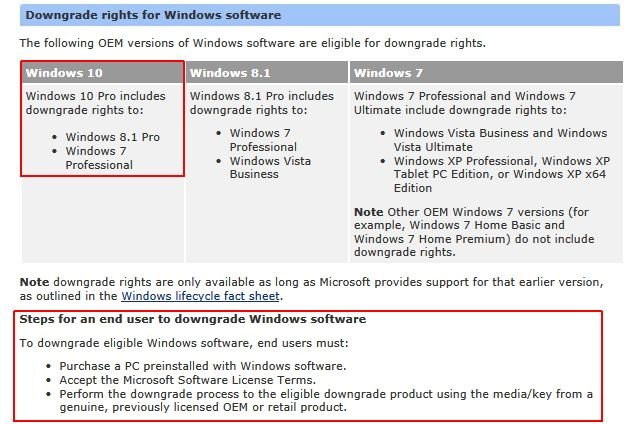
Summary:   Windows 10 OEM Editions qualifying for downgrades to a prior operating system

Comments:

  • Windows 10 Pro OEM Pre-installed is the only OEM edition qualifying for downgrade to a prior operating system
  • Windows 10 Pro OEM qualifies to downgrade to Windows 8.1 Pro and Windows 7 Professional

W108x7_Downgrade_01

  • Note: Windows 10 Retail editions(Home and Pro) ***Do Not***qualify for downgrading to a prior released operating system(e.g. Windows 7 or Windows 8)


Additional Information:


Revisions:

August 30, 2015: Original Draft

September 7, 2015: Original Published Date

Windows 10 Upgrade Paths

Posted: August 15, 2015 in Windows 10
Tags:

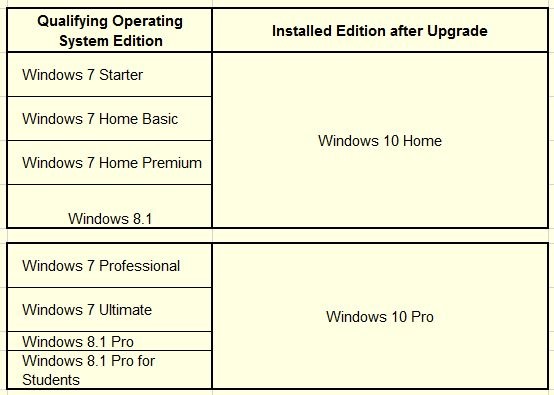
Summary:   Upgrade Paths for Windows 7/8 operating systems editions to Windows 10 operating system editions


Comments:

  • The installed Windows 7/8 genuine qualifying operating system edition used to upgrade to Windows 10 determines the installed edition of Windows 10.
  • Upgrade paths are applicable during and after the free Windows 7/8 to Windows 10 upgrade timeframe


Additional Information:

Win10_UpgradePath_01

cf. Table data source => Microsoft Windows 10 Specifications and System Requirements Upgrade Editions


Revisions:

August 15, 2015: Original Draft and Publish Date

August 18, 2015: Table size increased for visibility upon request from viewer(s)

August 1, 2016: Added comment on upgrade path applicability

Windows 10 RTM Released

Posted: July 30, 2015 in Windows 10
Tags:

Summary: 

  • Microsoft officially released the initial(RTM) build and version of Windows 10 on July 29, 2015.


Comments: 

  • Build Number – 1507      Version Number – 10240
  • Windows 10 is a free upgrade for genuine Windows 7 SP1 and Windows 8.1 Update operating systems
  • The free upgrade period starts on July 29, 2015 and ends on July 29, 2016
  • Windows 10 free upgrade is available via Windows Update on Windows 7 SP1 and Windows 8.1 Update devices.
  • Windows 10 installation media(DVD/USB) to upgrade and/or perform a clean installation will be available(for free) from Microsoft at a later date.


Additional Information:

Windows 10 Free Upgrade Available in 190 Countries Today

Windows 10 Specifications & Systems Requirements

Windows 10 Upgrade Frequently Asked Questions


Revisions:

July 29, 2015: Original Draft

July 30, 2015: Original Publish Date

August 2, 2015: Added link for System Requirements and Specifications

August 15, 2015: Added link for FAQ(Frequently Asked Questions)

Summary:

The Skype for modern Windows App(Windows 8 and later) will be replaced by Skype for Windows Desktop

Information:

1. On July 7, 2015 Microsoft will turn off Skype for modern Windows

2. To continue using Skype on Windows 8 and later Windows operating systems it will be necessary to use ‘Skype for Windows Desktop’

Comments:

  • Skype for modern Windows is the app included with Windows 8 and 8.1 operating systems.
  • Skype for Windows Desktop is a stand-alone downloadable and installable program
  • In the past Windows 8.0 and 8.1 allowed both versions (Modern app and Desktop program) to co-exist thus this change effective July 7, 2015 eliminates that possibility and makes Skype for Windows Desktop the sole Skype application for use on Windows 8 and 8.1 (and most likely Windows 10).
  • Skype for Windows Desktop can be downloaded here => Skype for Windows Desktop
  • Skype for modern Windows (the included Windows operating system App) should be uninstalled before installing Skype for Windows Desktop

  Notes:

  • If Skype for Windows Desktop is already installed, it may only be necessary to remove/uninstall the Skype modern Windows app and update Skype (manually using the latest downloadable installer file or updating via the Skype Desktop program ‘Update’ option)
  • When updating Skype for Windows Desktop it may also be preferable to download and use the Skype for Windows Desktop manual installer since the Skype program’s built-in updater has been known (and proven) to lag version(s) behind the latest available download version
  • Do pay attention (when upgrading/installing Skype) to the screen prompts for optional services. Ensure you accept or uncheck any supplemental plug-ins or other offerings (e.g. Skype Click to Call; Making Bing the default browser Search engine, etc.)


Official Notifications:

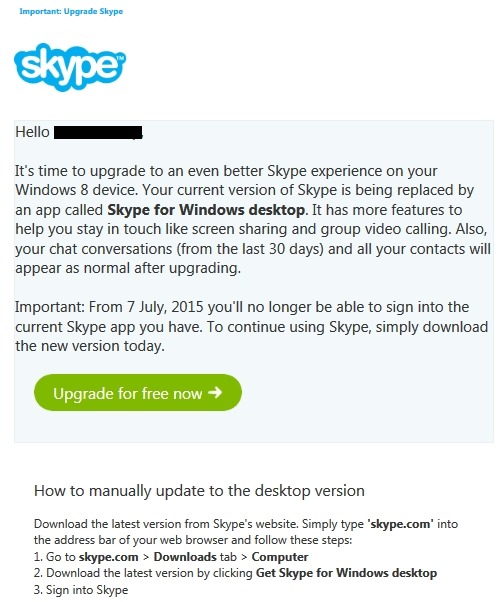
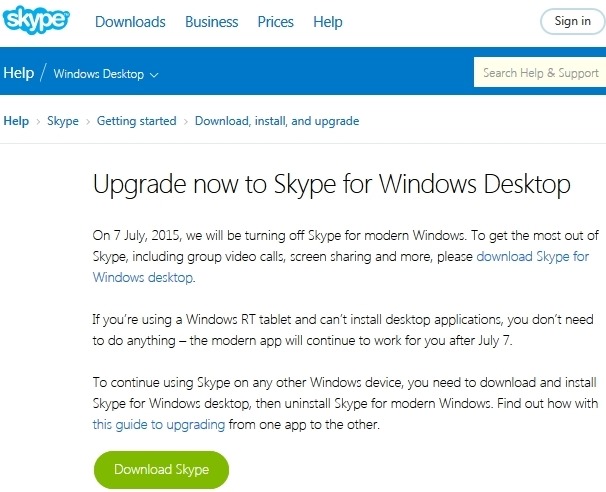
Two separate notices are available – email and web article. Both notices are shown below

SkypeDesk_EmailNotice_01


SkypeDesk_WebNotice_02


How To:

  • Note: The recommend method to upgrade from Skype for modern Windows to Skype for Windows Desktop Perform the following in the sequence shown below (Download Skype Desktop, remove Skype modern Windows app, install Skype for Windows Desktop)

Download Skype for Windows Desktop


Uninstall the Skype modern Windows app

– Close Skype by pressing Alt+F4 on your keyboard,
or by swiping from the top edge of the screen
– In the Start screen, right click or tap and hold the Skype tile.
The Options menu appears at the bottom of the screen.
– Select Uninstall from the Options menu

Install Skype for Windows Desktop

– Double click the Skype for Windows Desktop *.exe installer file
and follow the instructions to install
– When it’s installed, go to the Apps view
– Slide up from the middle of the Start screen with your finger,
or click the arrow near the lower left corner of the Start screen.
– Navigate and find the Skype for Windows Desktop app icon
(you may have to scroll past the modern apps first)
– Right click or tap and hold the app icon and select Pin to Start
– The app icon will appear at the end of your Start screen
but you can drag and drop it to wherever you like
– Click the Skype for Windows Desktop app icon to load and run Skype and configure to your preferences


Revisions:

June 19, 2015: Original Draft

June 21, 2015:  Updated ‘Comments’ and ‘How To’ section

Summary:

Windows 7 SP1 and Windows 8.1 upgrade options for Windows 10

Comments:

Upgrade options:

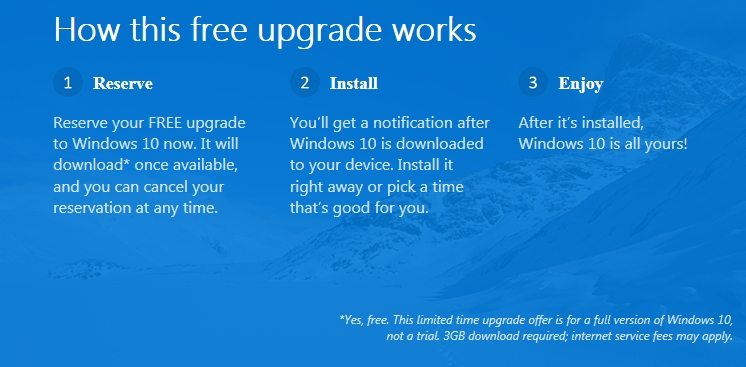
  • Reserve a free upgrade for Windows 7 SP1 and Windows 8.1 Update devices via the ‘Get Windows 10’ upgrade app icon in the lower right side of the Windows Task Bar.
  • Buy a new Windows 8.1 device and upgrade it for free to Windows 10
  • Note: Windows 7 SP1 and Windows 8.1 users have until July 29, 2016 to take advantage of the free Windows 10 Upgrade offer
  •  Get Windows 10 Upgrade app (graphic)

Win10_GetApp_01

Additional Information:

1.  Upgrade to Windows 10 For Free

https://www.microsoft.com/en-us/windows/windows-10-upgrade

2.  Windows 10 Questions and Answers (FAQ’s – Frequently Asked Questions)

https://www.microsoft.com/en-us/windows/windows-10-faq

3. Windows 10 upgrade via Windows Update is expected to be a download about 3 GB in size.

4.  Reserving Windows 10 via the ‘ Get Windows 10’ app will generate a compatibility report for devices and applications indicating if the device and installed applications are compatible with Windows 10

http://windows.microsoft.com/en-us/windows/what-compatiblity-report-means

5. The ‘Get Windows 10 app’ will place an icon in the lower right of the Windows Task Bar

6.  Reserving will place your device in a Microsoft Windows 10 upgrade queue for later download and install.

Revisions:

June 1, 2015: Original Draft and Publish Date

June 9, 2015: Added link for ‘What Compatibility Report Means’

Summary:

Microsoft publicly announced on June 1, 2015 the availability date for Windows 10

Comments:

  • Windows 10 will become available to the general public on July 29, 2015
  • Initial release will be available to/for PC’s and Tablets devices
  • Windows 10 initial release will be a free upgrade for Windows 7 Sp1 and Windows 8.1 pc and tablet devices
  • Windows 10 will be available via Windows Update and in full version media in the retail market
  • Windows 10 via Windows Update is expected to be approximately 3 GB (download size)
  • Third party (online, retail outlets) will have media (full version only) at a later date (est. end August 2015)


Additional Information:

Windows 10 Available on July 29

http://blogs.windows.com/bloggingwindows/2015/06/01/hello-world-windows-10-available-on-july-29/


Get Windows 10

http://www.zdnet.com/article/get-windows-10-microsofts-hidden-roadmap-for-the-biggest-software-upgrade-in-history/


Revisions:

June 1, 2015: Original Draft and Publish date

Windows 10 Editions

Posted: May 15, 2015 in Windows 10
Tags:

Summary:

Microsoft announced the different ‘Editions’ of Windows 10 applicable to consumers, small business, and enterprise customers.


Comments:

  1. Six Editions of Windows 10 will be available

      • Home
      • Mobile
      • Pro
      • Enterprise
      • Education
      • Mobile Enterprise


  2. Enterprise and Mobile Enterprise will be released in versions supporting ATMs, Retail POS, Handheld terminals, Industrial (Robotics) and IoT Core for small footprint devices 

  3. Home, Mobile, and Pro are available as the free upgrade for qualifying Windows 7, Windows 8.1 and Windows 8.1 Phone devices when upgraded within the first year after Windows 10 is released.

  4. Windows 10 is expected to be released/launched in the summer of 2015.

  5.  These are Windows ‘Editions’ not SKU’s (at this time it is unknown if OEM and/or System Builder versions of these ‘Editions’ will be available for purchase and use.

6.  Two, and only two, Editions will be available and also qualify for the free upgrade on existing pc- Home and Pro

7.  Windows 10 Enterprise is and ‘upgrade only’ Edition. Business are required to purchase a Pro license to take advantage of and qualify for the Enterprise upgrade. (i.e. purchasing two licenses is required – Pro and Enterprise).


 Additional Information:

http://blogs.windows.com/bloggingwindows/2015/05/13/introducing-windows-10-editions/

Revisions:

1. May 13, 2015: Original Draft Date

2. May 14, 2015: Original Publish Date

 3. May 17, 2015: Corrected typo, added ‘Comments’ item #5, #6, and #7

Summary:

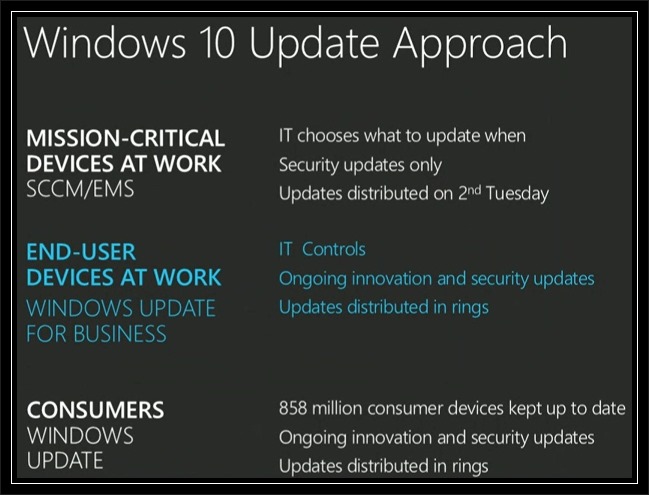
Windows Updates in Windows 10 will have different deployment/distribution methods for Consumers, Business, Enterprise and Phone customers on personal and business devices

Comments:

1.  The different distribution methods are:

  • Current Branch – Consumers will will regularly receive all new features, security updates and other fixes to the operating system. No choice will be available as to which updates they wish to receive or don’t receive. All updates will be deployed via Windows Updates but not on any given day (i.e. no Patch Tuesday). This method is also applicable to all Windows 10 Mobile devices personal and business.
  • Long Term Servicing Branch – Enterprise Customers will have an option to received security updates only without new features. The pace of the updates will be able to be controlled using existing mechanisms (e.g. WSUS, System Configuration Manager, Enterprise Mobility Suite)
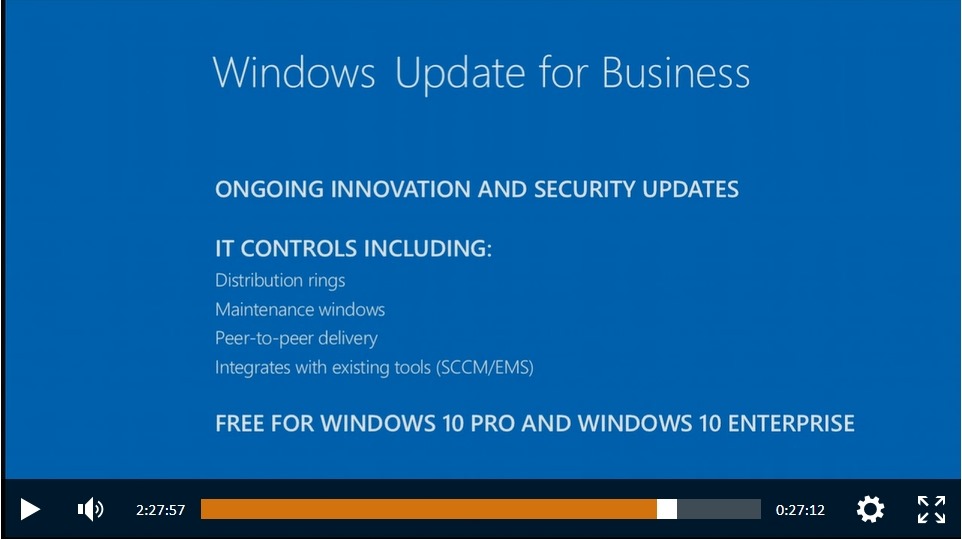
  • Windows Update for Business – End users not running mission critical devices will be able to receive new features, security updates, and other fixes at a measured pace (Distribution Rings, Maintenance Windows, Peer to Peer Delivery, and Integration with existing System Management tools) for Windows 10 Pro and Windows 10 Enterprise devices. 

Additional Information:

2.  Windows Updates in Windows 10 was presented during Microsoft Ignite – Microsoft’s show for IT professionals.

3.  A video containing Windows 10 Update Approach can be viewed/downloaded on:

     http://channel9.msdn.com/Events/Ignite/2015/KEY01

  NOTE:

  • The Windows 10 Windows Update presentation starts at the 2 hour, 20 minute 20 sec. mark (2:20:20)
  • The presenter is Terry Myerson, Executive Vice President of Operating Systems, Microsoft Corporation.


4.  Windows 10 Windows Update ‘Approach’ and ‘Windows Update for Business’ slides from the Ignite show

W10_WU_01

W10_WU_02


5.  Windows Update for Business will be free for Windows Pro and Windows Enterprise

6.  Microsoft Windows Blog – Announcing Windows Update for Business

   http://blogs.windows.com/bloggingwindows/2015/05/04/announcing-windows-update-for-business/

Revisions:

May 6, 2015: Original Draft Date

May 12, 2015: Original Publish Date

May 13, 2015:  Added ‘Additional Information, Item #6