Summary:

Windows 7 SP1 and Windows 8.1 upgrade options for Windows 10

Comments:

Upgrade options:

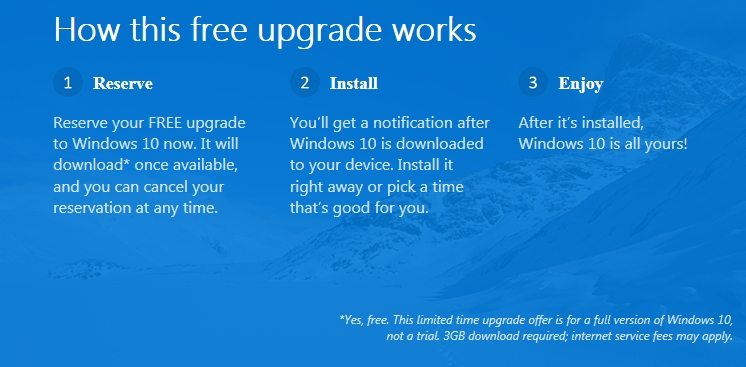
  • Reserve a free upgrade for Windows 7 SP1 and Windows 8.1 Update devices via the ‘Get Windows 10’ upgrade app icon in the lower right side of the Windows Task Bar.
  • Buy a new Windows 8.1 device and upgrade it for free to Windows 10
  • Note: Windows 7 SP1 and Windows 8.1 users have until July 29, 2016 to take advantage of the free Windows 10 Upgrade offer
  •  Get Windows 10 Upgrade app (graphic)

Win10_GetApp_01

Additional Information:

1.  Upgrade to Windows 10 For Free

https://www.microsoft.com/en-us/windows/windows-10-upgrade

2.  Windows 10 Questions and Answers (FAQ’s – Frequently Asked Questions)

https://www.microsoft.com/en-us/windows/windows-10-faq

3. Windows 10 upgrade via Windows Update is expected to be a download about 3 GB in size.

4.  Reserving Windows 10 via the ‘ Get Windows 10’ app will generate a compatibility report for devices and applications indicating if the device and installed applications are compatible with Windows 10

http://windows.microsoft.com/en-us/windows/what-compatiblity-report-means

5. The ‘Get Windows 10 app’ will place an icon in the lower right of the Windows Task Bar

6.  Reserving will place your device in a Microsoft Windows 10 upgrade queue for later download and install.

Revisions:

June 1, 2015: Original Draft and Publish Date

June 9, 2015: Added link for ‘What Compatibility Report Means’

Summary:

Microsoft publicly announced on June 1, 2015 the availability date for Windows 10

Comments:

  • Windows 10 will become available to the general public on July 29, 2015
  • Initial release will be available to/for PC’s and Tablets devices
  • Windows 10 initial release will be a free upgrade for Windows 7 Sp1 and Windows 8.1 pc and tablet devices
  • Windows 10 will be available via Windows Update and in full version media in the retail market
  • Windows 10 via Windows Update is expected to be approximately 3 GB (download size)
  • Third party (online, retail outlets) will have media (full version only) at a later date (est. end August 2015)


Additional Information:

Windows 10 Available on July 29

http://blogs.windows.com/bloggingwindows/2015/06/01/hello-world-windows-10-available-on-july-29/


Get Windows 10

http://www.zdnet.com/article/get-windows-10-microsofts-hidden-roadmap-for-the-biggest-software-upgrade-in-history/


Revisions:

June 1, 2015: Original Draft and Publish date

Windows 10 Editions

Posted: May 15, 2015 in Windows 10
Tags:

Summary:

Microsoft announced the different ‘Editions’ of Windows 10 applicable to consumers, small business, and enterprise customers.


Comments:

  1. Six Editions of Windows 10 will be available

      • Home
      • Mobile
      • Pro
      • Enterprise
      • Education
      • Mobile Enterprise


  2. Enterprise and Mobile Enterprise will be released in versions supporting ATMs, Retail POS, Handheld terminals, Industrial (Robotics) and IoT Core for small footprint devices 

  3. Home, Mobile, and Pro are available as the free upgrade for qualifying Windows 7, Windows 8.1 and Windows 8.1 Phone devices when upgraded within the first year after Windows 10 is released.

  4. Windows 10 is expected to be released/launched in the summer of 2015.

  5.  These are Windows ‘Editions’ not SKU’s (at this time it is unknown if OEM and/or System Builder versions of these ‘Editions’ will be available for purchase and use.

6.  Two, and only two, Editions will be available and also qualify for the free upgrade on existing pc- Home and Pro

7.  Windows 10 Enterprise is and ‘upgrade only’ Edition. Business are required to purchase a Pro license to take advantage of and qualify for the Enterprise upgrade. (i.e. purchasing two licenses is required – Pro and Enterprise).


 Additional Information:

http://blogs.windows.com/bloggingwindows/2015/05/13/introducing-windows-10-editions/

Revisions:

1. May 13, 2015: Original Draft Date

2. May 14, 2015: Original Publish Date

 3. May 17, 2015: Corrected typo, added ‘Comments’ item #5, #6, and #7

Summary:

Windows Updates in Windows 10 will have different deployment/distribution methods for Consumers, Business, Enterprise and Phone customers on personal and business devices

Comments:

1.  The different distribution methods are:

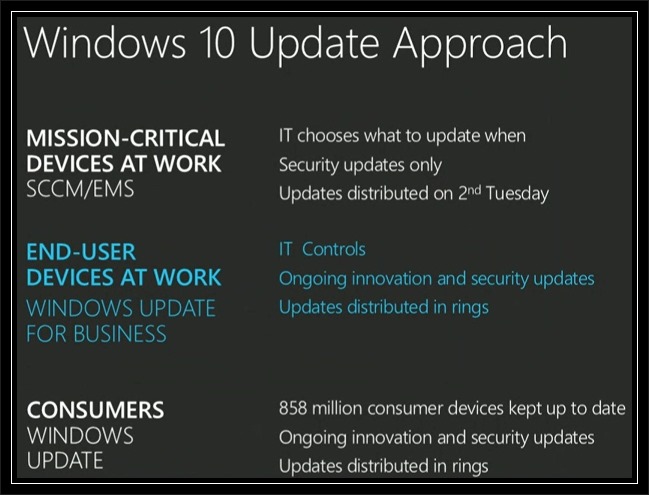
  • Current Branch – Consumers will will regularly receive all new features, security updates and other fixes to the operating system. No choice will be available as to which updates they wish to receive or don’t receive. All updates will be deployed via Windows Updates but not on any given day (i.e. no Patch Tuesday). This method is also applicable to all Windows 10 Mobile devices personal and business.
  • Long Term Servicing Branch – Enterprise Customers will have an option to received security updates only without new features. The pace of the updates will be able to be controlled using existing mechanisms (e.g. WSUS, System Configuration Manager, Enterprise Mobility Suite)
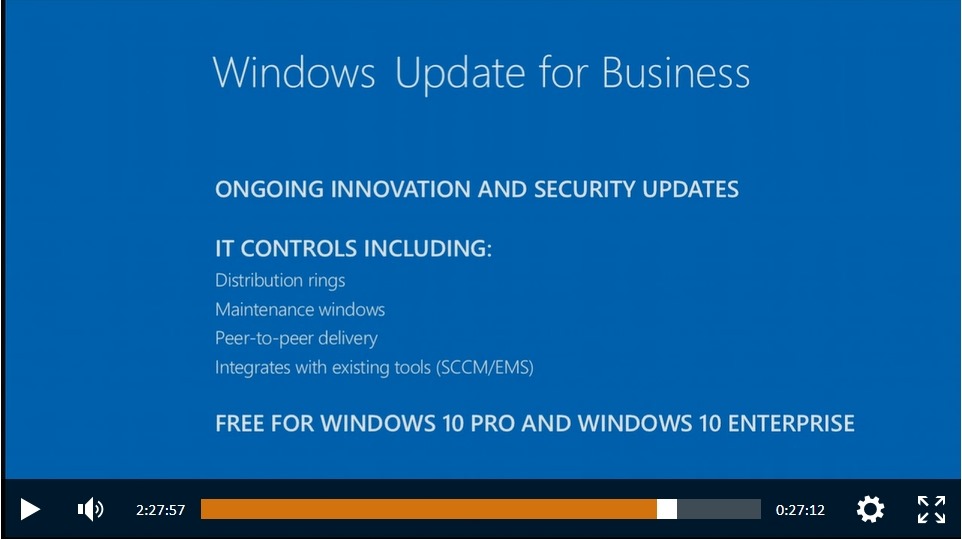
  • Windows Update for Business – End users not running mission critical devices will be able to receive new features, security updates, and other fixes at a measured pace (Distribution Rings, Maintenance Windows, Peer to Peer Delivery, and Integration with existing System Management tools) for Windows 10 Pro and Windows 10 Enterprise devices. 

Additional Information:

2.  Windows Updates in Windows 10 was presented during Microsoft Ignite – Microsoft’s show for IT professionals.

3.  A video containing Windows 10 Update Approach can be viewed/downloaded on:

     http://channel9.msdn.com/Events/Ignite/2015/KEY01

  NOTE:

  • The Windows 10 Windows Update presentation starts at the 2 hour, 20 minute 20 sec. mark (2:20:20)
  • The presenter is Terry Myerson, Executive Vice President of Operating Systems, Microsoft Corporation.


4.  Windows 10 Windows Update ‘Approach’ and ‘Windows Update for Business’ slides from the Ignite show

W10_WU_01

W10_WU_02


5.  Windows Update for Business will be free for Windows Pro and Windows Enterprise

6.  Microsoft Windows Blog – Announcing Windows Update for Business

   http://blogs.windows.com/bloggingwindows/2015/05/04/announcing-windows-update-for-business/

Revisions:

May 6, 2015: Original Draft Date

May 12, 2015: Original Publish Date

May 13, 2015:  Added ‘Additional Information, Item #6

Summary:

Note:  This article is obsolete – Microsoft has removed all software for Windows Essentials and Windows Live Essentials applications from their servers. Downloading the Full or Web Version installer is no longer possible from Microsoft.  The links shown below will no longer function.  Main article left intact solely for archival purposes.

  • Links to download the current version (now called) Windows Essentials 2012 applications/programs
  • Links to download the 2011 version of the Windows Live Essentials 2011 applications/programs
  • Links to download the 2009 version of  the Windows Live Essentials 2009 applications/programs
  • Earlier versions (Windows Live Essentials 2008) are no longer available from Microsoft

Links:

  • Windows Essentials 2012
  • Windows Live Essentials 2011 
  • Windows Live Essentials 2009


Direct download to Microsoft server for the installer executable file

Full Version 2012 installer – English Language Version
http://g.live.com/1rewlive5-all/en/wlsetup-all.exe

Web Version 2012 Installer – English Language Version
http://g.live.com/1rewlive5-web/en/wlsetup-web.exe

Full Version 2011 Installer – English Language Version
http://g.live.com/1rewlive4-all/en/wlsetup-all.exe

Web Version 2011 Installer – English Language Version
http://g.live.com/1rewlive4-web/en/wlsetup-web.exe

Full Version 2009 Installer – English Language Version
http://g.live.com/1rewlive3/en/wlsetup-all.exe
Web Version 2009 Installer – English Language Version
http://g.live.com/1rewlive3/en/wlsetup-web.exe

Note: Direct download links above are for the English language installer. For a different country replace the ‘en’ with the local language code.

Comments:


1. System Requirements (2012 version) -suggested reading
  http://windows.microsoft.com/en-US/windows/Windows-Essentials-2012-system-requirements

2. Release Notes (2012 version)  – suggested reading
  http://windows.microsoft.com/en-us/windows/essentials-2012-release-notes

3. Windows Live Essentials 2009 – Earlier version still available for compatibility and use on no-longer-supported operating systems Windows XP  and Server 2008.  **Not recommended for use on Vista or later Windows operating systems.**

4. Photo Gallery and Movie Maker in Windows Essentials 2012 were rebranded as Windows Photo Gallery and Windows Movie Maker. No name change in branding for Windows Live applications (Mail, Messenger, and Writer)

5. Photo Gallery and Movie Maker in Windows Essentials 2012 install as one combined, single package.

6. Windows Update KB 2741355 is a pre-requisite for DirectX 9 support in Movie Maker on Windows 7 or Windows Server 2008 R2 systems.

7. Windows Live Messenger was deprecated but remains included in the installer since the installer pre-dates the deprecation. Windows Live Messenger is no longer functional and should not be installed. Windows Live Messenger has been replaced by Skype. Skype can be downloaded here – http://www.skype.com/en/download-skype/skype-for-computer/ 

If Messenger is installed then after first use a prompt to upgrade to a ‘new version’ of Messenger will appear. The ‘new version’ is Skype.  Upgrading to Skype via the prompt will uninstall Messenger. Messenger can also be uninstalled manually via the Control Panel (Programs and Features/Windows Essentials 2012 or Programs and Features/Windows Live Essentials)

8. Live Mesh (included in 2011 version) was discontinued and no longer available.  Live Mesh replacement is OneDrive (fka SkyDrive).

Revisions:


May 8, 2015:  Original Draft Date

May 9, 2015:  Comment section updated

May 10, 2015: Original Publish Date

March 27, 2017: Added Note about blog article obsolescence regarding Microsoft removal of software from their servers

The purpose of this blog is to provide information (Technical, How-To, Help, Product Notices) about Microsoft operating systems and services with a focus on Windows 10, Windows Insider Program, Microsoft Accounts, Outlook.com, OneDrive, and Windows Essentials.

Additionally, my maintenance approach to many of these blog post is to update the article(post) with additional and new information whenever applicable to ensure a continuous improvement timeline which provides greater flexibility as a resource for end users(and of course myself) references.  All articles have a ‘Revision’ category with notes on changes/edits/content.

Enjoy!

….winston


Summary:

Microsoft permits uploading up to 10 GB size files to OneDrive

Comments:

1. Feature is supported by Windows and Mac desktop apps, all mobile apps, and OneDrive web user interface

2. Supported by Microsoft’s ‘Share from OneDrive’ feature allowing sharing of larger files over e-mail

Additional Information:

1. Outlook.com blog article

http://blogs.office.com/2014/10/08/outlook-com-now-supports-sharing-larger-files-onedrive/

2. Share from One Drive

https://www.youtube.com/watch?v=1XpPJHxum5s

3.  OneDrive Blog – OneDrive Now Supports 10 GB Files

https://blog.onedrive.com/onedrive-now-supports-10-gb-files/


Revisions:

November 2, 2014: Original Draft and Published Date

December 17, 2014: Added Comment Item #3

May 5, 2015: Republish to Windows Unplugged Blog; changed wording in Comments