

Summary:
Windows Updates in Windows 10 will have different deployment/distribution methods for Consumers, Business, Enterprise and Phone customers on personal and business devices
Comments:
1. The different distribution methods are:
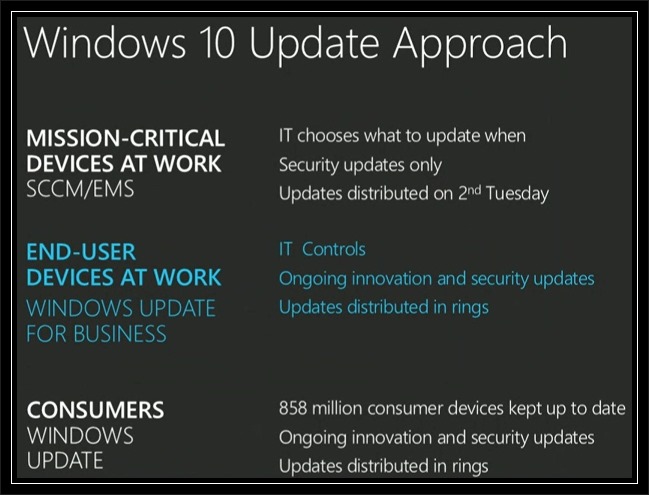
- Current Branch – Consumers will will regularly receive all new features, security updates and other fixes to the operating system. No choice will be available as to which updates they wish to receive or don’t receive. All updates will be deployed via Windows Updates but not on any given day (i.e. no Patch Tuesday). This method is also applicable to all Windows 10 Mobile devices personal and business.
- Long Term Servicing Branch – Enterprise Customers will have an option to received security updates only without new features. The pace of the updates will be able to be controlled using existing mechanisms (e.g. WSUS, System Configuration Manager, Enterprise Mobility Suite)
- Windows Update for Business – End users not running mission critical devices will be able to receive new features, security updates, and other fixes at a measured pace (Distribution Rings, Maintenance Windows, Peer to Peer Delivery, and Integration with existing System Management tools) for Windows 10 Pro and Windows 10 Enterprise devices.
Additional Information:
2. Windows Updates in Windows 10 was presented during Microsoft Ignite – Microsoft’s show for IT professionals.
3. A video containing Windows 10 Update Approach can be viewed/downloaded on:
http://channel9.msdn.com/Events/Ignite/2015/KEY01
NOTE:
- The Windows 10 Windows Update presentation starts at the 2 hour, 20 minute 20 sec. mark (2:20:20)
- The presenter is Terry Myerson, Executive Vice President of Operating Systems, Microsoft Corporation.
4. Windows 10 Windows Update ‘Approach’ and ‘Windows Update for Business’ slides from the Ignite show
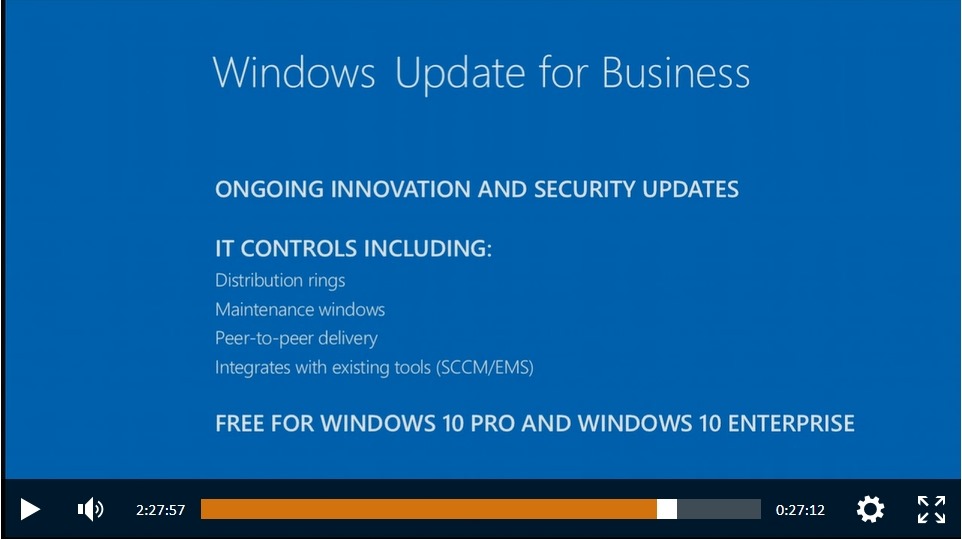
5. Windows Update for Business will be free for Windows Pro and Windows Enterprise
6. Microsoft Windows Blog – Announcing Windows Update for Business
http://blogs.windows.com/bloggingwindows/2015/05/04/announcing-windows-update-for-business/
Revisions:
May 6, 2015: Original Draft Date
May 12, 2015: Original Publish Date
May 13, 2015: Added ‘Additional Information, Item #6

 Windows Unplugged
You must be logged in to post a comment.