Archive for March, 2017

Summary:    Microsoft will begin rolling out the Windows 10 Creators Update on April 11, 2017


Comments:

  • Microsoft will begin to deploy the Creators Update on April 11, 2017
  • The Creators Update will be deployed via Windows Update
  • Deployment will, as in the past for major o/s feature updates, be a measured/staged rollout
      • i.e. not everyone receiving the new bits at the same time
  • The Creators Update is Version 1703 with an expected Build.Sub-build Number of 15063.0
  • Installation of 1703 will most likely download additional fixes and patches(during or immediately after installation updating the Sub-build number e.g. 15063.11)
  • On or shortly after the April 11th rollout the Media Creation Tool should be updated to allow Windows 10 end-users to create USB/DVD installation media and/or an ISO file for creating DVD media or mounting
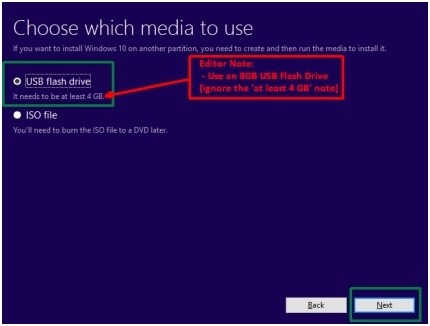
    • Note: (1) If creating USB media use an 8 GB USB Flash drive; (2)if creating a DVD then Dual Layer DVD media will most likely be required
  • Notable new features included in the Creators Update are Paint 3D, improved Start Menu, Windows Defender Security Center, and additional Personalization options
  • Highly recommended to backup your operating system and data prior to installing the Creators Update
        •  ===> Image your operating system and backup your data to external media


Additional Information:


Revisions:

March 30, 2017:  Initial Draft and Initial Publish Date

April 1, 2017:  Added comments on USB Flash drive size(8 GB)
Summary:  How to create Windows 10 installation media using the Windows 10 Media Creation Tool

Comments:

  • This article provides a text and graphical overview of the steps to create Windows 10 USB installation media using the available (free) Microsoft Windows 10 Media Creation Tool
  • The information shown is for using the latest available Windows 10 Version 1607 Media Creation Tool
    • The digital signature of the latest version is ‎Thursday, ‎December ‎8, ‎2016 1:14:04 AM
  • When creating Windows 10 Version 1607 media the following media capacities are required
    • USB Flash Drive – 8 GB
    • DVD disc – Dual Layer DVD – 8.5 GB
        • Note: When creating Windows 10 media containing both 32 bit (x86) and 64 bit (x64) architectures for both both Home and Pro editions you should use USB media with a 16 GB minimum size
  • Windows 10 Version 1607 created media by design includes both Home and Pro editions
        • If desired, the option to create media for Windows 10 Home- Single Language is available, but only select this option is you are running Windows 10 Home Single Language
  • Direct link to download the Media Creation Tool (MediaCreationTool.exe)


Media Creation Process:

    1. Download and save the Media Creation Tool executable file (MediaCreationTool.exe)
    2. Right click the Media Creation Tool executable file and select ‘Run as Administrator’
    3. Connect a USB Flash Drive – As noted above an 8 GB size drive is required
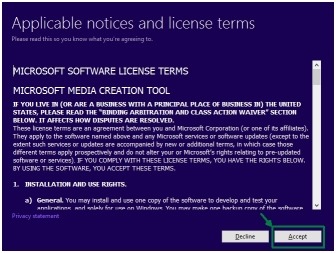
    4. Accept the License Terms
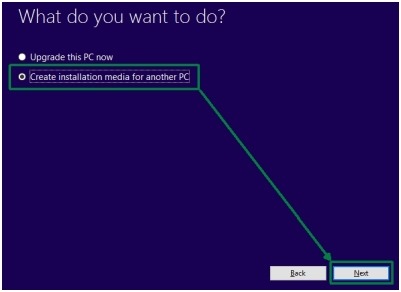
    5. Choose ‘Create Installation media for another pc’; Click Next
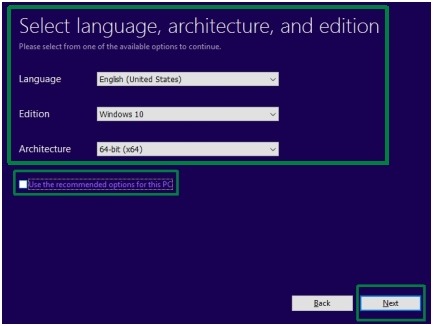
    6. Choose a language, edition, and architecture; Click Next
    7. Select ‘USB Flash Drive’ on the ‘Choose which media to use’ page; Click Next
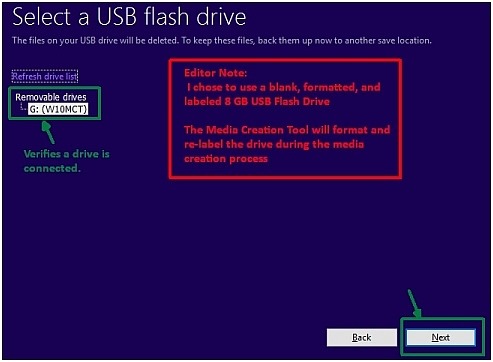
    8. Select and verify the correct USB Flash Drive; Click Next
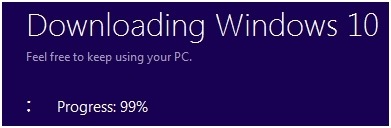
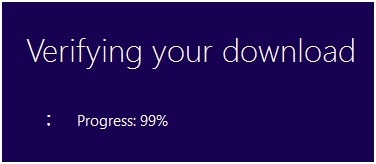
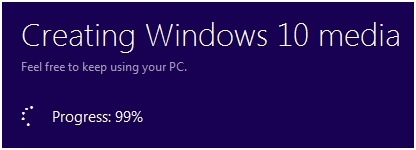
    9. The tool will proceed to download, verify and create Windows 10 Version 1607 media
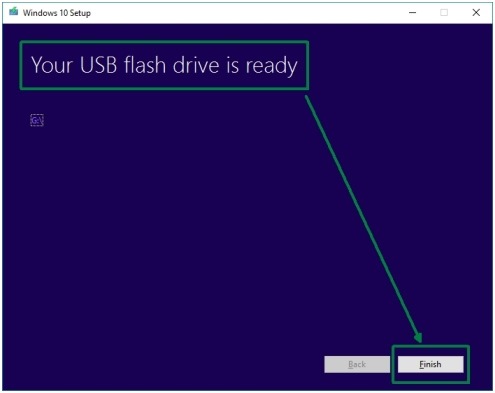
    10. Once Complete, the final screen will inform that your ‘USB Flash Drive ‘is Ready’


Graphical Overview of the Media Creation Process:

P1

P2

P3

P4

P5

P6

P7 P8

P9

P10

Additional Information:


Revisions:

August 3, 2016: Initial Draft and Initial Publish Date

October 31, 2016:  Added more detail for clarification in the ‘Comments’ section

January 31, 2017: Added ‘Graphical Overview’ section

March 28, 2017: Rewrote entire article, added and updated information, deleted original from blog, republished

March 31, 2017:  Corrected  link about Downloading ISO file (Rhonda, Thanks for the ping)

April 6, 2017: Updated Publicize options

Summary:  Microsoft officially removed the ability to download the Windows Essentials 2012 Full Version installer file from their servers.


Comments:

  • Last week Microsoft officially discontinued the ability for end-users to obtain(download) the Full version installation file for Windows Essentials 2012. (The web version installer was removed some time ago)
  • The removal of the installer file has been expected since Microsoft ended all support for Windows Essentials 2012 in January 10, 2017.   Windows Live Essentials 2011 and 2009 installer files were removed and ceased support quite some time ago.
        • End of support means no further updates(patches/fixes/compatibility), no security updates, no Junk Mail filter updates, and no support for use on current Microsoft supported operating systems(Windows 7/8.1/10)
  • The Windows Essential 2012 installer file may be available from other avenues(friends, third party sources) though caution is warranted from obtaining installation files from outside sources.
          • [Editor note: Not recommended and proceed at your own risk]
  • It would be prudent, if still using a Windows Essentials 2012 products(Mail, PhotoGallery/Movie Maker, Writer) to consider investigating and/or switching to an alternative program for your computing needs and experience.
        • Continued use of Photo Gallery(which is primarily a Photo Viewing application with some editing capability) may be acceptable from a risk standpoint
        • Open Live Writer, compliments of Microsoft, a replacement for Writer remains available as an open source program and has been since 2015
        • Windows Live Mail and its continued use as a mail/news client is feasible but do note that no future security updates will ever be released for the product(nor have any been released for some time) or definition updates for its built-in Junk Mail filter thus always practice safe computing when opening/previewing email and ensure a resident Anti-virus/Anti-malware client is running on your chosen operating system(e.g. Windows Defender on Windows 10)
  • It would also be a good idea to consider archiving any important data to an external source outside of Windows Essential application programs(e.g. email messages and Contacts exported/backed-up to an external thumb or hard drive).
  • FYI – The Windows Essentials suite of products (fka Windows Live Essentials) had a lifespan of just short of 10 years(first released in May 2007 as ‘Windows Live Installer’ comprising of the unified(web based) installers for Messenger, Mail, and Writer)


Revisions:

March 24, 2017: Initial Draft Date

March 26, 2017: Initial Publish Date